Edited by ONULSURI EditorialUpdated
AI automation is the practice of using language models and related AI components inside a workflow that starts from a trigger, gathers context, proposes or selects a next step, and then takes an action — usually through tools, APIs, or software systems you already operate.
It is not magic autonomy. Deterministic automation follows fixed rules you wrote in advance. AI-assisted automation adds a probabilistic step: the model interprets messy language, classifies intent, extracts fields, drafts content, or chooses among allowed tools. That flexibility is useful, and it is also why validation, permissions, and human review matter.
This guide explains how AI automation workflows are structured, where they work well, where they should stay careful, how human-in-the-loop gates fit, and how protocols such as MCP relate without turning every integration into a chat experiment.
What Is AI Automation?
At a practical level, AI automation connects three ideas: an event that starts work, an AI step that interprets or transforms information, and an action that changes a system or produces an output for a person.
Examples include classifying an incoming support message, extracting structured fields from an email, drafting a reply for review, routing a ticket, summarizing a long document into a checklist, or deciding which approved tool to call next.
The AI step is probabilistic. Given the same prompt twice, outputs can vary. Traditional scripts and SQL queries are deterministic: the same inputs yield the same outputs. Good designs treat model output as a proposal that must pass checks before irreversible work happens.
Traditional Automation vs AI Automation
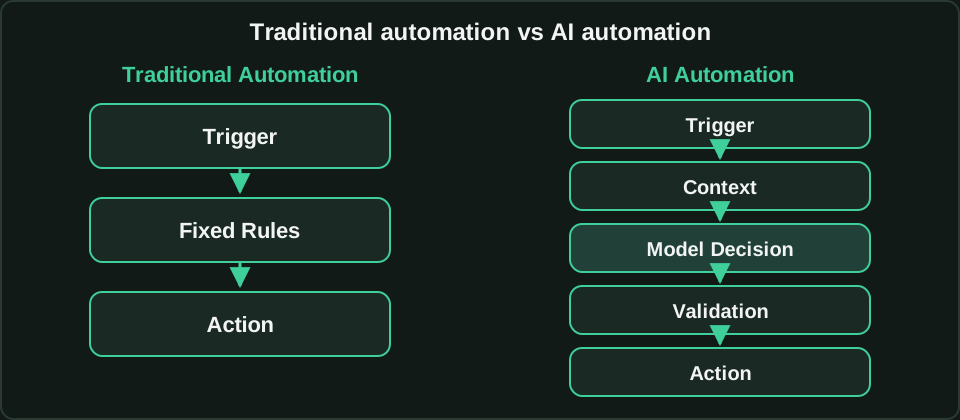
Traditional automation is rule-based. A trigger fires, conditions evaluate, and an action runs. It excels when the input is structured, the edge cases are known, and correctness is more important than flexibility.
AI automation keeps the trigger and action ends, but inserts interpretation in the middle. Instead of encoding every phrase a customer might use, you provide context and ask a model to classify, extract, or draft within bounds you define.
Use traditional automation when inputs are already clean and the decision tree is short. Use AI assistance when language is messy, categories are many, or drafting would otherwise require a person for every case — then add validation so the model cannot silently invent facts or exceed permissions.
The Anatomy of an AI Automation Workflow
Most durable workflows share the same skeleton, even when product names differ.
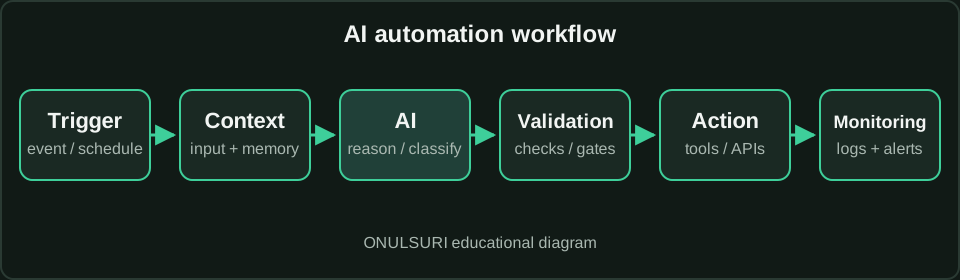
Trigger: a webhook, inbox message, form submit, schedule, queue event, or manual start. Be explicit about idempotency — what happens if the same event arrives twice.
Input and context: the payload plus retrieved memory (prior tickets, account status, policy snippets, tool schemas). Context quality often matters more than model choice.
AI reasoning or classification: the model proposes a label, extraction, plan, or draft. Keep the allowed output schema tight when you need machine-readable next steps.
Tool or action: create a ticket, update a CRM field, send a message, call an internal API, or write to a queue. Prefer least privilege.
Validation: schema checks, allowlists, PII filters, business rules, and confidence or risk routing that you define in code — not only in a prompt.
Human approval where appropriate: a gate outside the model that must clear before high-impact actions execute.
Logging and monitoring: store identifiers, decisions, tool calls, approval outcomes, and errors so you can audit and improve the workflow.
Example AI Automation Workflow
Imagine an inbound operations request arriving by email or form: “Please update the shipping address on order 18422 and confirm.”
Trigger: message lands in a monitored inbox. Context: load the order record, customer identity signals, and a short policy note about what agents may change.
Classify: the model labels the request as address_update (not refund or cancellation). Extract: order id, new address fields, and requester email.
Validate: confirm the order exists, the requester is authorized, the address parses, and the change is within policy. If anything fails, stop or escalate.
Human review if needed: address changes for high-value orders or mismatched identity route to a person with the AI proposal and source text side by side.
Execute: call the order API to update the address. Log: write the classification, extraction, validation results, approver (if any), API response, and timestamps.
This pattern — propose, validate, escalate when stakes rise, then act — scales better than “let the model call any tool because the prompt said be helpful.”
Where AI Automation Works Well
High-volume, reversible, or draft-first work: triage, routing, summarization, extraction into forms, first-pass replies, and internal checklist generation.
Semi-structured language tasks where writing every rule would be brittle: intent classification across many phrasings, normalizing free-text dates, or mapping messy product names to a catalog with a constrained choice set.
Assistive preparation for experts: gather context, propose an action, and present a decision-ready package so a human finishes faster without rubber-stamping blindly.
Where AI Automation Should Be Used Carefully
Irreversible money movement, access grants, legal commitments, medical advice, or destructive deletes should not auto-execute from a free-form model decision.
Tasks that require exact numbers, balances, or regulatory citations belong with deterministic systems (databases, calculators, verified documents). The model can help draft or navigate, not invent the source of truth.
Open-ended tool access without allowlists invites prompt injection and over-permissioned actions. Treat tool descriptions and retrieved text as untrusted input to the decision loop.
Human-in-the-Loop Automation
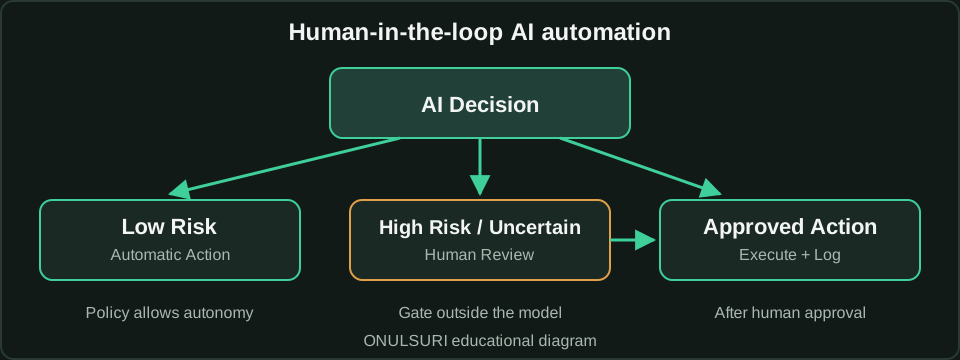
Human-in-the-loop means the orchestration layer can pause and require a person before an action runs. A prompt that says “ask the user first” is not enough if the runtime can still call tools without an external gate.
Route by policy: low-risk reversible steps may run automatically; high uncertainty, high impact, or regulated actions require review. Policy should be versioned in code or config — not left as a soft instruction the model can ignore.
Give reviewers the proposal, evidence snippets, intended tool call, and impact summary. Capture who approved what and when. Sample-audit some automatic decisions so drift and automation bias do not hide.
AI Automation and MCP
Model Context Protocol (MCP) is an open standard for connecting AI applications to external systems through hosts, clients, and servers that expose tools, resources, and prompts. Official documentation describes it as a shared connector pattern so integrations are not reinvented for every host.
MCP is useful inside AI automation when you want portable, permissioned access to tools and data across compatible applications. It standardizes discovery and invocation; it does not make model outputs correct, and it does not replace your validation or approval gates.
In a workflow, MCP servers can supply the tool/action layer (and sometimes resources for context). Your automation still owns triggers, policy, logging, and human escalation. For a deeper protocol overview, see the published ONULSURI MCP Guide.
Protocol details such as transports and SDK APIs change over time — confirm the current specification at modelcontextprotocol.io when you implement. This article’s MCP relationship claims align with the official getting-started framing (retrieved 2026-08-03).
How to Design Your First AI Automation
1. Pick one narrow job with clear success criteria (for example: classify inbound requests into five labels with 95% of clear cases auto-routed).
2. Write the happy path and the failure path on paper: trigger → context → AI schema → validation → action or escalate.
3. Constrain outputs with a schema or enum. Prefer structured JSON over free prose when the next step is code.
4. Start tools read-only. Add write actions only after validation and, for higher risk, an approval gate.
5. Log everything needed to replay a decision. Measure precision on a labeled sample before expanding volume.
6. Document who owns policy changes and how secrets are stored. Ship the smallest useful loop, then widen categories carefully.
Common AI Automation Mistakes
Treating fluent drafts as verified facts. Skipping schema validation. Giving the model broad production credentials.
Encoding safety only in prompts. Hiding errors instead of escalating. Measuring success by “tickets closed” without sampling quality.
Automating the loudest request first instead of the safest high-volume one. Copying vendor demos as production architecture.
Security and Privacy Considerations
Minimize data in prompts. Redact secrets and unnecessary personal data before model calls. Keep long-term logs free of raw credentials.
Separate identities for automation services. Rotate keys. Prefer short-lived tokens. Scope tools to the minimum paths and methods required.
Assume retrieved documents and tool results can contain injection attempts. Do not let untrusted text redefine system policy. Confirm consent and retention rules for any customer content you process.
Monitoring and Reliability
Track volume, latency, validation failure rates, escalation rates, tool error rates, and human override rates. Alert on sudden shifts — they often signal prompt drift, schema changes, or abuse.
Define retry policy carefully: retries may be safe for reads and dangerous for non-idempotent writes. Use idempotency keys where APIs support them.
Plan for degraded mode: if the model provider is down, fall back to queueing, rules-only triage, or human-only handling rather than silent data loss.
Conclusion
AI automation works when you combine flexible interpretation with deterministic controls: clear triggers, tight schemas, validated actions, honest logging, and human gates where impact demands them.
Start small, measure real outcomes, and keep irreversible steps behind policy-enforced approval. Use standards such as MCP to connect tools cleanly — then keep ownership of safety in your orchestration layer.
FAQ
- What is AI automation in simple terms?
- It is a workflow that starts from a trigger, uses an AI model to interpret or transform information, then takes an action through tools or systems — usually with validation and sometimes human approval.
- How is AI automation different from traditional automation?
- Traditional automation follows fixed rules on structured inputs. AI automation adds a probabilistic interpretation step for messy language or classification, which requires extra validation because outputs can vary.
- Should every AI step run without a human?
- No. Low-risk reversible steps may run automatically under policy. High-impact, uncertain, or regulated actions should pause for human review enforced outside the model.
- How does MCP relate to AI automation?
- MCP standardizes how AI applications discover and call tools, resources, and prompts across hosts and servers. It can power the tool/action layer of a workflow, but your orchestration still owns triggers, validation, logging, and approvals.
- Is this article published on ONULSURI?
- Yes. It is live on Insights after an explicit publication step. Phase 48 human approval was required first, but approval alone did not publish the page.
Related
- MCP Guide — Published explainer on hosts, clients, servers, tools, and safe adoption.
- Prompt Injection Guide — Direct vs indirect injection, tool blast radius, and defense-in-depth patterns.
- AI Insights — Category home for AI explainers.
- Insights hub — Browse all Insights categories.
- AI agents explained — How tool-using agents differ from simple chat.
- AI security considerations — Broader security framing for AI tooling.